Dachshund Sausage Dog Weiner Clipart
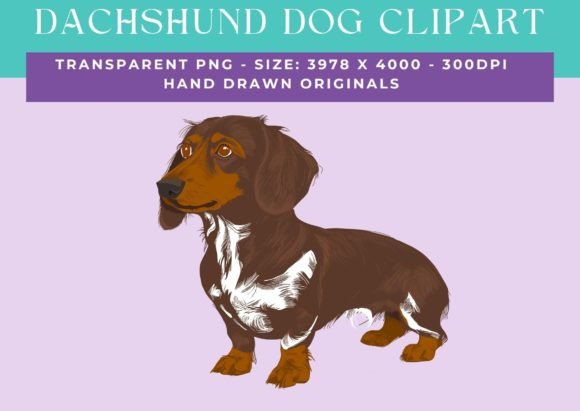
If you have ever searched for dog-themed design assets, you have likely noticed that most options feel generic or lifeless. The Dachshund Sausage Dog Weiner clipart stands apart because it is an original hand-drawn image, not a stock vector that has been reused a thousand times. This single transparent PNG file measures 3978 x 4000 pixels at 300 dpi, giving you a huge, crisp canvas that can be shrunk down for business card details or blown up for a poster without losing sharpness. The real appeal, however, lies in how you can adapt it for projects that range from wedding invitations to beach towels, and everything in between.
Because the image is hand-drawn, it carries a warm, personal feel that many digital creations lack. The slightly uneven lines and natural flow of the ink make the dachshund character more endearing, whether you use it for a child’s bedroom mural or a quirky café logo. The large size and transparent background also mean you can layer it over photographs, textured papers, or solid colours without any white halo or box around it.
Before diving into specific uses, it is worth understanding the single most important rule that comes with this clipart: you cannot use the graphic in its purchased, unaltered form as a standalone design. You must combine it with other elements, change colours significantly, or incorporate it into a larger composition. This is not a limitation — it is an invitation to make the artwork your own. When you modify the dachshund, it stops being a generic download and becomes a signature piece for your brand, project, or product.
Creative applications for crafters and DIY enthusiasts
For anyone who enjoys hands-on projects, this clipart opens up a world of possibilities that go far beyond simple printing and framing. The high resolution and transparency allow you to use the image in materials and techniques that demand precision.
Paper crafts and cardmaking
Imagine creating a birthday card for a dog lover. You can resize the dachshund to fit the front of an A2 card, change its colour to match the recipient’s favourite palette, and add a speech bubble or a wreath of flowers around it. Because the PNG is transparent, you can print it directly onto cardstock and then embellish with glitter, embossing powder, or die-cut paper elements. The hand-drawn style works beautifully with mixed media — try stamping a pattern behind the dog or layering it over a watercolour wash. For scrapbooking, use the image as a focal point on a page celebrating a new pet or a dog park outing. Reduce its opacity to create a subtle background texture, then print other photos and journaling cards on top.
Vinyl decals and home décor
One of the most popular uses for a high-quality transparent PNG is making custom vinyl decals. With a cutting machine (like a Cricut or Silhouette), you can trace the dachshund outline and cut it from permanent or removable vinyl. Stick it on a laptop, water bottle, car window, or nursery wall. Since the original file is 300 dpi and large, you can scale it down to 2 inches for a decal on a coffee mug or up to 12 inches for a statement wall sticker. The hand-drawn quality gives the decal an illustrative charm that machine-generated fonts and clipart often lack. For home décor, consider transferring the design onto wood using gel medium, creating a one-of-a-kind sign for a hallway or kitchen. You could also silkscreen the dachshund onto fabric to make custom pillows, tea towels, or canvas wall art.
Decoupage and mixed media
Decoupage enthusiasts will appreciate that a 300 dpi PNG printed on standard paper or cardstock can be cut out and glued onto furniture, trays, or boxes. Seal it with Mod Podge, and the hand-drawn lines stay crisp. Because the image is only one element, you can combine it with paper napkins, patterned tissue, or vintage book pages. A simple side table coated with floral paper and featuring a dachshund in the centre becomes an eye-catching conversation piece. The large canvas size means you can print multiple copies at different scales to create a collage effect.
How small business owners and freelancers can use the clipart
If you run a small brand, blog, or e-commerce store, this clipart can serve as the foundation for a cohesive visual identity — as long as you customise it sufficiently. The key is to treat the original hand-drawn image as a starting point that you can reinterpret to match your brand’s voice.
Logo and branding
A dachshund makes a memorable logo for pet-related businesses like dog walking, grooming, pet sitting, or a specialty dog bakery. To avoid a generic look, change the colour to your brand palette, rotate the dog into a dynamic pose (perhaps looking up or jumping), and add a small element such as a bone, collar, or star that ties into your business name. Because the file is so large, you can crop part of the image — for example, just the head and front paws — to create a simpler emblem that works well in small spaces like favicons or social media avatars. Combine the traced vector with a clean sans-serif or playful script font. The hand-drawn nature of the clipart will give your brand approachability, while the colour change and cropping make it unmistakably yours. Remember that you cannot use the image as-is for your logo; you must alter it significantly. That could mean inverting the colours, adding a texture, or merging it with a geometric shape.
Merchandise and product design
Selling custom merchandise is a popular revenue stream for many creators, and this clipart can be the seed for a whole product line. For mugs, use the dachshund as a central motif with a funny quote or a seasonal element like a Santa hat. For T-shirts, print the dog large across the chest in a single colour (such as navy or forest green) and pair it with simple text below. Because the PNG is 300 dpi, you can send it directly to a print-on-demand service (after modifications) and the output will be sharp. For stationery items like notebooks, journals, or cards, place the dachshund in the corner or use a repeating pattern made from the image rotated and resized. Pillows, beach towels, and bedding can also feature the dog, but again, ensure you alter the colour scheme or combine it with stripes, dots, or other illustrations. When designing for merchandise, always test your modified version on a mockup before ordering in bulk.
Digital content and social media graphics
Bloggers and influencers who cover pet topics can use this clipart to create consistent visual branding. Take the dachshund, change its colour to match your brand palette, and use it as a watermark on photos, a profile icon, or a recurring element in your Instagram stories. Because it is transparent and high-res, you can place it over photos of real dachshunds without looking clumsy. For Pinterest pins, overlay the dog on a bright background with bold text about training tips or product reviews. The hand-drawn aesthetic stands out in a sea of flat, minimalistic stock photos.
Practical guidance for getting the best results
To keep your projects looking polished and professional, there are a few technical and creative considerations to keep in mind when working with this clipart.
Resizing and resolution
Because the file is nearly 4000 pixels on each side, you have enormous flexibility. However, remember that scaling down is easy, but scaling up beyond the original dimensions can cause pixelation. If you need a version larger than 4000 pixels, consider tracing the image in a vector program to create an SVG — that way you can enlarge it infinitely. For print projects, maintain at least 300 dpi; for screen use, you can drop to 72 dpi without quality loss. Always work on a copy of the original file so you can revert if a modification does not work out.
Colour changes and personalization
The hand-drawn lines are likely black or dark grey. Change the line colour to match your project — use a warm brown for a classic dachshund, pastel pink for a baby shower invitation, or metallic gold for a luxury label. You can also fill the body with a solid colour or a pattern. In photo editing software, use the magic wand tool to select the area inside the outlines and fill it with your chosen hue. If the lines are not closed, you may need to paint manually. For a more modern look, turn the image into a silhouette by filling the whole dog with a single colour and removing the internal lines. This is a valid modification that makes the clipart your own.
Combining with other elements
To satisfy the usage terms (and to create a more unique design), always add at least two additional elements. This could be a background shape (circle, star, or banner), text, other animals, flowers, or geometric patterns. For example, place the dachshund inside a heart, or have it holding a balloon. The key is that the clipart is not the sole focus of your composition. Layering it with hand-lettered quotes or scanned textures (like watercolour splashes or wood grain) instantly transforms it into an original piece. Use blending modes like Multiply or Overlay to integrate the dog with background textures seamlessly.
Keeping your output consistent
If you plan to use the dachshund across multiple products or platforms, create a style guide for yourself. Decide on two or three colours, one font, and one additional decorative element (like a bone or a daisy) that will appear alongside the dog in every variation. This consistency builds brand recognition without relying on the same exact image. For example, a stationery line might use the dachshund in the same shade of teal on every card, with a small handwritten “hello” in the corner. A T-shirt line might use the dog in white on black shirts, paired with a single star. Small business owners can apply the same principle to their logo variations for social media, invoices, and packaging.
Why this clipart works for different audiences
The versatility of this Dachshund Sausage Dog Weiner clipart lies in its style and technical specs. For educators creating worksheets or bulletin boards, the hand-drawn look is friendly and approachable. For marketers designing pet-related ads, the high resolution ensures the image looks professional in print. For hobbyist crafters, the transparent background removes the hardest part of digital design — cutting out a subject. For entrepreneurs who sell on Etsy or other marketplaces, the ability to modify colours and combine the dog with other elements means you can produce a whole product line from a single asset. And because the image is an original hand drawing, it feels less corporate and more heartfelt, which resonates with audiences aged 20 to 50 who value authenticity over perfection.
When you approach this clipart as raw material rather than a finished product, you unlock its full potential. The large canvas, high resolution, and transparent background are technical perks, but the real value is the creative freedom they give you. Whether you are making invitations for a Dachshund-themed wedding, designing a logo for a dog-walking service, or creating a line of quirky kitchen towels, this single image can adapt to your vision — as long as you put your own stamp on it. That is what turns a simple download into a meaningful, marketable, or gift-worthy creation.