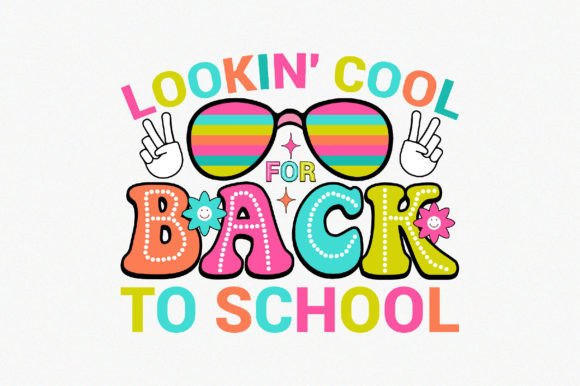
Lookin Cool for Back to School: A Versatile Design Asset
When you need a design that bridges fun and professionalism, Lookin Cool for Back to School offers a solid foundation. This isn’t just a graphic; it’s a complete package of vector and raster files ready for apparel, home goods, and digital use. Whether you’re a creator launching a new product line, a teacher personalizing classroom gear, or a small business owner building a seasonal collection, this design provides flexibility without sacrificing quality. Each download comes with a carefully prepared set of file formats, including PNG, EPS, PDF, AI, SVG, and a print-ready transparent file at 4500×5400 pixels and 300 dpi. The vector-based shapes mean you can resize endlessly, change colors in seconds, and adapt the artwork to almost any medium.
What Makes This Design Stand Out?
At its core, Lookin Cool for Back to School is built with 100% vector shapes. That means every curve and line remains crisp whether you’re printing a small mug or a large hoodie. The included files are fully editable in Adobe Illustrator (EPS 10 format) and compatible with other vector software like Affinity Designer or CorelDRAW. You also get support files in JPG and transparent PNG, ready for quick placement or preview. The compressed ZIP folder ensures easy organization, and extraction with WinZIP or a similar tool gives you immediate access to all six formats. For anyone who values efficiency, having one design that works across multiple products is a real time-saver.
The high resolution at 300 dpi means your final prints will look professional, with no pixelation or blur. And because the background is transparent in both the PNG and the vector files, you can layer the design onto any color fabric, paper, or digital backdrop. This adaptability is especially useful for creators who produce a range of items – from t-shirts and sweaters to pillows and mugs – without needing to rework the artwork for each surface.
Creative Ways to Use the Design
One design doesn’t have to mean one look. The Lookin Cool for Back to School graphic can be the starting point for many creative directions.
Apparel and Clothing
Printing on t-shirts or hoodies is the most obvious application, but consider placement. A centered design works well on a classic crewneck, while a smaller version near the left chest gives a more subtle, logo-like feel. For hoodies, you might place the graphic on the back for a bold statement or on the front pocket area for a casual vibe. Since the design is vector-based, you can also split it into multiple colors – for example, using a metallic foil for text and a soft matte for the illustration. This approach works especially well for back-to-school gear aimed at teens or young adults who want something unique.
Home and Lifestyle Products
Don’t overlook non-apparel uses. Placing the design on a mug creates a quick gift or promotional item for teachers or students. For pillows, the high-res PNG ensures the pattern stays sharp even on large fabric surfaces. You can also adjust the color palette to match room decor or branding. The transparent format makes it easy to layer over a photo or pattern, opening up possibilities for hybrid designs like a mug that combines the graphic with a school-related background.
Digital and Print Media
Beyond physical products, the Lookin Cool for Back to School files can enhance websites, social media posts, or printable resources. Bloggers writing about back-to-school tips can use the design as a featured image or a banner. Educators can incorporate it into classroom newsletters or bulletin board decorations. The SVG format is ideal for web use, scaling perfectly on retina displays. And if you need to adapt the design for different platforms, the editable vector shapes let you remove elements, change text (if any), or adjust proportions.
Tailoring the Design for Different Audiences
Different users have different goals, and this design can be tweaked to speak to each audience effectively.
For Teachers and Educators: Add chalkboard textures or school-related icons like pencils, apples, or books. The clean vector lines allow you to incorporate these extras without cluttering the composition. You could also change the main color to a classroom-friendly scheme, such as earthy greens and warm yellows, to create a more grounded, calm aesthetic.
For Parents and Families: Consider creating matching sets – one for the child, one for the parent. Scale the design up or down to fit adult and kid sizes. Since the file is easily editable, you can swap colors to match each person’s preferences while keeping the same basic layout. This works well for family photo shoots or just fun everyday wear.
For Small Business Owners and Marketers: Use the Lookin Cool for Back to School design as the anchor for a limited-edition product line. Offer it on multiple items in your store: t-shirts, tote bags, notebooks, and phone cases. Because the vector format allows rapid iteration, you can produce variations for different customer segments – a sporty version for older kids, a colorful version for younger ones – all from the same original artwork. Include mockups in your marketing to show how the design looks on real products, but note that the download itself does not include mockup files; you can create your own using the transparent PNG.
For Bloggers and Content Creators: The design can become a recognizable part of your brand during the back-to-school season. Use it as a watermark on photos, a header for articles, or even a printable download for your audience. Because the design is high-res, you can crop sections to create patterns or dividers. Bloggers who focus on productivity or organization can pair the graphic with list-style content, reinforcing the back-to-school theme without being too literal.
Practical Tips for Working with Vector Files
Getting the most out of this design requires a bit of know-how, but the process is straightforward. After downloading the ZIP file, extract its contents using WinZIP or a similar utility. You’ll find six individual files: PNG, EPS, PDF, AI, SVG, and an additional transparent PNG. Open the AI or EPS file in Adobe Illustrator (or an alternative like Inkscape for free). From there, you can modify colors, scale, and even alter shapes if you need to integrate the design with other assets.
Keep a consistent color palette. If you’re printing multiple products, decide on a set of two or three core colors before you start editing. This ensures that your t-shirt matches your mug, and your mug matches your digital graphics. Because the design is made of vector shapes, you can use the “recolor artwork” feature in Illustrator to swap colors globally in seconds.
Respect the print parameters. Even though the artwork is high-res, always test a small sample before committing to a large batch. For t-shirts, make sure the colors contrast well with the fabric color. For mugs, consider the printing method (sublimation vs. screen printing) and how that affects color vibrancy. The transparent background is a huge help when layering, but check that your printer or print-on-demand service accepts transparent PNGs or vector files – many do, and it saves time.
Stay organized. Name your edited versions clearly (e.g., “LookinCool_blue_hoodie.ai” and “LookinCool_green_mug.png”). This prevents confusion when you’re working on multiple products at once. Also, keep the original ZIP intact in case you need to start over.
Staying Original and Effective
While the Lookin Cool for Back to School design is ready to use out of the box, adding a personal touch helps it stand out. You might combine the graphic with your own typography or integrate it into a larger composition. If you’re creating for a school group or club, consider adding a mascot or emblem next to the design. The vector format allows for such additions without losing quality.
Originality also means paying attention to your audience. A design that works for a college student might need brighter colors or a more playful font for elementary students. Test variations with a small focus group if possible – friends, colleagues, or social media followers can give quick feedback. Because the design is editable, you can iterate fast.
Finally, think about consistency. If you’re using the design across a product line, keep the core elements the same but vary the size, orientation, or color to suit each product’s shape. For example, a vertical version might work better on a long pillow, while a centered square crop fits a mug. The transparent PNG makes it easy to overlay on mockups and see how the design interacts with the product’s form.
Whether you are a seasoned designer or someone just starting to explore print-on-demand, Lookin Cool for Back to School offers a blend of convenience and creative potential. The file package removes technical hurdles, leaving you free to focus on color choices, product combinations, and audience fit. With a little imagination, this single design can become the centerpiece of a memorable back-to-school collection.