5th Grade Level Complete Class of 2024: A Digital Design Asset for Your Craft Workflow
When a child finishes fifth grade, it marks a real milestone. They have navigated elementary school, built foundational skills, and are now ready for the transition to middle school. Celebrating that achievement with a custom keepsake, a T-shirt, or a party favor is a natural instinct for parents, teachers, and family members. That is exactly where the 5th Grade Level Complete Class of 2024 digital design file enters the picture.
This asset is not just a cute graphic. It is a functional, print-ready file that fits directly into a predictable workflow for anyone who uses cutting machines, print-on-demand services, or DIY craft production. Whether you are a small business owner, a hobbyist, or a parent looking to create something personal, understanding how this file works before, during, and after your project will save you time, reduce frustration, and improve the quality of your final product.
What the 5th Grade Level Complete Class of 2024 File Actually Is
The product is a collection of digital artwork files delivered inside a zipped folder. Inside that folder, you will find four formats:
- SVG – Scalable Vector Graphic, ideal for Cricut, Silhouette, and other cutting machines
- DXF – Drawing Exchange Format, compatible with many design and cutting software platforms
- PNG Transparent – A raster image with a transparent background, ready for printing or layering
- EPS – Encapsulated PostScript, useful in professional design software like Adobe Illustrator and CorelDRAW
Each format serves a specific purpose. The SVG file, for example, allows you to resize the design without losing quality, which is essential when you are scaling a graphic from a small sticker to a large pillow or tote bag. The PNG file, with its transparent background, is ready to drop onto a T-shirt mockup or a mug template. The DXF file is widely supported by older cutting machine software, and the EPS file gives professional designers the flexibility to edit layers, change colors, and combine elements with other artwork.
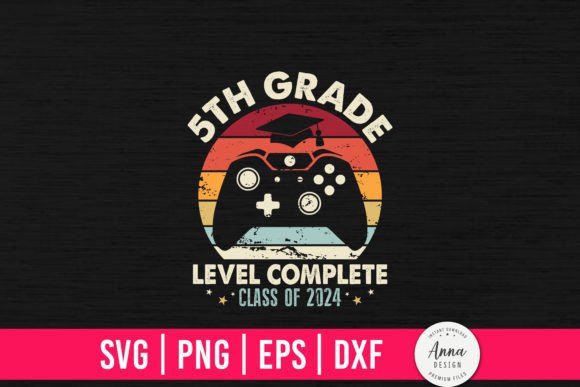
This particular design is built around the phrase 5th Grade Level Complete, styled with a video-game-inspired aesthetic. It resonates with kids and parents alike, turning an academic achievement into a visual celebration. For a small craft business, this kind of timely, trend-aware design can be a strong addition to your product catalog during the end-of-school season.
Where This File Fits in a Broader Workflow
A digital design file like this is not a standalone product. It is a component in a series of decisions and actions. Understanding where it fits helps you use it more effectively.
Before the Project: Preparation and Planning
Before you even open the file, you need to decide what you are making. Ask yourself a few practical questions:
- What substrate am I using? Fabric, ceramic, paper, glass, or vinyl?
- What material thickness and type does my cutting machine support?
- Do I need a single color design, or do I want to use multiple layers?
- How many units do I plan to produce?
Once you have answers, you can choose the right format from the zipped folder. If you are cutting heat-transfer vinyl for a T-shirt, the SVG file is your best option. If you are printing directly onto a mug or a pillow using sublimation, the transparent PNG file will save you the step of removing a background. Preparing these decisions before you open your software reduces trial and error.
Also check the compatibility of the files with your specific machine and software. Cricut Design Space, Silhouette Studio, and Adobe Illustrator all handle SVGs well, but you should confirm that your software version supports the format. If you are using an older version of a design program, the DXF file may be more reliable. The EPS file is particularly useful if you plan to modify the design—changing the font, adjusting the color palette, or adding a student name—because vector editing tools handle EPS layers cleanly.
During the Project: Execution and Integration
When you are actively producing items, the 5th Grade Level Complete Class of 2024 file interacts with your tools in specific ways. Here is how it typically plays out in a real workflow:
- Import the file into your cutting software. If you are using Cricut Design Space, upload the SVG file directly. It will arrive with its layers intact, which is helpful if the design includes multiple colors or elements.
- Check the size and orientation. The file will come at a default dimensions. Resize it to fit your product. For a standard adult T-shirt, a design around 10 to 12 inches wide works well. For a mug, you will want it much smaller, around 3 to 4 inches wide.
- Adjust colors if needed. Vector files are easy to recolor. If you want the text in gold and the background accent in navy, you can do that in your software without damaging the original file.
- Prepare the mat. Place your material on the cutting mat, and load it into the machine. Use the correct blade and pressure settings for your material type. For adhesive vinyl, a standard cut setting works. For thick cardstock or glitter vinyl, you may need to increase pressure or use a deep-cut blade.
- Cut, weed, and transfer. After the machine cuts, weed away the excess material. Apply transfer tape if you are moving the design to a final surface. For sublimation, skip the weeding and move directly to pressing.
This sequence is repeatable. Once you set up the file correctly, you can produce multiple units with consistent quality. That consistency matters if you are filling orders for a class set of T-shirts or making party favors for a group of graduates.
After the Project: Quality Control and Long-Term Use
Once the items are made, check for alignment, color accuracy, and edge cleanliness. Did the vinyl lift cleanly? Is the PNG print crisp on the substrate? If you are selling these items, photograph the finished product and keep notes on what settings worked best for each material. Those notes become your reference for the next time you use the file.
The digital file itself does not expire. You can use it year after year, as long as you store it properly. Keep the zipped folder on your computer or cloud drive. Label it clearly so you can find it when the 2025 graduation season approaches. If you modify the file for a specific customer, save a copy with a different name so you do not lose the original.
One practical tip: maintain a master folder for all your SVG, PNG, DXF, and EPS files. Subdivide it by theme or by year. That way, when a parent asks if you can make a 5th Grade Level Complete shirt in a specific color, you can locate the file immediately and start working without recreating anything.
Practical Implementation Tips for Different Use Cases
The real value of this digital design file becomes clear when you apply it across different scenarios. Here are some common use cases and the workflow considerations for each.
For a Small Craft Business
If you run a small T-shirt or personalized gift business, adding seasonal designs keeps your catalog fresh. The 5th Grade Level Complete Class of 2024 design fits the end-of-school window, which runs roughly from April to June. List it in your shop as a product you can customize with the student name or school year. Use the EPS or SVG file to add text without degrading image quality. Offer the design on multiple products: T-shirts, pillows, tote bags, and decals. The transparent PNG file is particularly useful for print-on-demand platforms like Printful or Printify, where you can upload it directly and position it on a product mockup.
For a Teacher or School Volunteer
Teachers often organize class events or graduation ceremonies. With this file, you can create matching shirts for the class or small favors like stickers and cupcake toppers. The key here is volume. You need a workflow that produces consistent results across many units. Use the SVG file for cutting vinyl, and batch your work by cutting multiple sheets of the same material in one session. Check your machine capacity and plan your cutting mats in advance to avoid delays on the day of the event.
For a Parent Making a Personal Gift
If you are making a single item for your own child, you have more flexibility to experiment. Do a test cut on scrap material first. If you are new to using SVG files, watch a tutorial on uploading to Cricut Design Space. The PNG file is also a great fallback: you can print it on iron-on transfer paper and use a household iron if you do not own a cutting machine. The workflow is simpler but still produces a personalized result.
For a Hobbyist or Crafter
If you enjoy making items for friends and family, this file gives you a quick project you can complete in an evening. The main process steps are the same, but you can focus on creativity. Try layering the design with other elements like stars, grad caps, or the student age. Use the EPS file if you want to edit the vector paths and create your own variation. Because the file is digital, you can explore multiple versions without wasting physical materials.
Compatibility, Usability, and Organization
One aspect that is easy to overlook is how these files interact with different software. Not all cutting machine programs handle each format with the same ease. Here are some observations from real use:
- Cricut Design Space works best with SVG and DXF. The PNG file can be used for print-then-cut, but you need to ensure the transparent area is properly recognized.
- Silhouette Studio (paid edition) handles SVG and EPS well. The free version may require DXF for vector imports.
- Adobe Illustrator opens EPS and SVG natively. This is the environment to use if you plan to modify the design heavily.
- Other graphic design tools like Inkscape (free) and Affinity Designer also support SVG and EPS.
Organizing your files is just as important as choosing the right format. When you download the zipped folder, extract it immediately. Create a folder called "5th Grade Level Complete 2024" and place all four files inside. If you later make customized versions, save them into separate subfolders. Good organization prevents you from searching through dozens of untitled files when orders come in.
Efficiency and Quality Control
Efficiency in a craft workflow comes from reducing rework. Every time you have to re-cut a design because the size was wrong or the color was off, you waste material and time. Using the correct file format from the start is a simple way to improve your yield. For example, using the PNG file for a sublimation project means you skip the weeding step entirely, which is a major time saver when producing multiple items.
Quality control also depends on the file itself. Because the design is provided as a clean vector, you do not need to trace or clean up pixel edges. That reduces the chance of fuzzy cuts or ragged lines. When you upload the SVG into your cutting software, inspect the layers. If the text is grouped with other elements, you may want to ungroup them to adjust spacing or alignment. Small adjustments like these improve the look of the final product.
Long-Term Use and Resale Considerations
A digital file like this has a long shelf life if you handle it correctly. The design is tied to the year 2024, so its direct relevance peaks in the spring and summer of that year. However, the vector elements can be repurposed. You can modify the year in the EPS or SVG file to create a Class of 2025 version. You can also extract elements like the graduation cap or the game-style level badge and use them in other designs.
If you plan to resell items made from this design, check the commercial use terms provided by the seller. Many digital design files for cutting machines allow you to sell finished physical products but restrict resale or sharing of the digital file itself. Respecting those terms keeps your business compliant and supports the designers who create these assets.
Final Observations on Working with Digital Design Files
The 5th Grade Level Complete Class of 2024 SVG, PNG, DXF, and EPS file is a practical tool for anyone who wants to celebrate a milestone with a custom physical item. Its value is not just in the artwork itself, but in how it fits into your existing process. By preparing your materials and software in advance, choosing the right file format for your method, and storing the files for future use, you turn a simple download into a repeatable, efficient part of your craft workflow.
Whether you are making one shirt for your own child or fifty for a class event, the same principles apply. Understand what you are building, pick the right tool from the four formats provided, and execute with consistency. That is how a digital design becomes a finished product that people actually want to wear, display, and remember.