How to Integrate Medallion Seamless Patterns into Your Design Workflow
Patterns are among the most versatile assets in a designer's toolkit, and medallion seamless patterns offer a particularly refined blend of symmetry, detail, and repeatability. Whether you are building a brand identity, designing textiles, or creating printable materials, understanding how to work with these patterns efficiently can significantly improve your output quality and save time during production.
This article walks through what medallion seamless patterns are, where they fit in a creative workflow, and how to implement them practically across different types of projects.
What a Medallion Seamless Pattern Actually Is
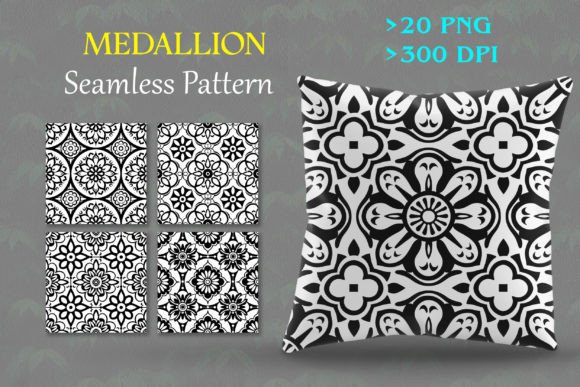
A medallion seamless pattern is a repeating design built around a central ornamental motif, often circular or shield-shaped, with intricate detailing radiating outward. The “seamless” aspect means the pattern repeats without visible breaks or seams, making it suitable for large surfaces such as fabric, wallpaper, or digital backgrounds.
These patterns draw from historical decorative arts, including Persian rugs, Renaissance tapestries, and Baroque architecture, but they have been modernized for digital use. The key characteristic is that the motif is designed to tile perfectly, so the pattern can be repeated infinitely while maintaining visual continuity.
From a practical standpoint, a medallion seamless pattern is not just a decorative element but a structural tool. It can define a visual hierarchy, frame content, or serve as a background that adds depth without competing with foreground elements.
Before Production: Planning and Asset Preparation
Incorporating a medallion seamless pattern early in a project helps establish a consistent visual language. When you select a pattern before designing other elements, you can coordinate colors, scale, and complexity with the rest of your assets.
For example, if you are designing a product label, choosing the medallion pattern first allows you to set the background texture, then build typography and branding elements that contrast or complement the pattern. This prevents last-minute color mismatches or scaling issues that can occur when patterns are added at the end.
Having a set of pre-made patterns, such as the Medallion Seamless Pattern Collection with 20 PNG files at 300 dpi, gives you a library to pull from during the planning phase. You can test multiple options against your layout without creating patterns from scratch.
During Production: Integration and Repetition
When you are actively designing, medallion seamless patterns serve as a background or accent layer. Because they are tileable, you can apply them to large areas without worrying about visible seams. This is particularly useful in textile design, where patterns must repeat across yards of fabric, or in digital backgrounds for websites, presentations, or social media graphics.
One efficient workflow is to place your medallion pattern on a separate layer, then use blending modes or opacity adjustments to control its prominence. This way you preserve the pattern's detail while keeping it subtle enough for text or foreground elements to remain readable.
The fact that the patterns are provided as PNG files at 300 dpi means they are print-ready for most standard outputs. If you are designing for web, you can resize them downward without losing sharpness. For print, the high resolution ensures crisp edges even at larger scales.
After Completion: Reuse and Adaptation
A major practical advantage of seamless patterns is their reusability. Once you integrate a medallion pattern into one project, you can use the same asset in future projects by simply recoloring it, combining it with other patterns, or scaling it differently. This saves time and maintains brand consistency across a series of products or campaigns.
For instance, a fashion designer might use a gold medallion pattern for a summer collection and later use the same pattern in a monochrome version for a winter line. A graphic designer might use a medallion pattern as a website background and later repurpose the same file for a print brochure.
Preparation: Choosing the Right Pattern for Your Medium
Before you start working with a medallion seamless pattern, consider the medium you are designing for. Different surfaces and formats require different pattern densities and color palettes.
- Fashion and textiles: Look for patterns with balanced repeat sizes. If the medallion is too large, it may look distorted on small garment pieces. If it is too small, the detail may be lost in production.
- Digital art and design: Patterns with moderate complexity work best for screens where fine details might be lost at lower zoom levels. The 300 dpi PNG files give you flexibility to scale down for web use without aliasing.
- Printable materials: For stationery, gift wrap, or labels, ensure the pattern has enough contrast against the base color so it prints clearly. Test the pattern with a small sample before committing to a large print run.
- Crafting and DIY projects: Medallion patterns work well on surfaces like cardstock, vinyl, or fabric. Because the patterns are tileable, you can cover large surfaces like scrapbook pages or decoupage projects without misalignment.
Compatibility with Design Software
Medallion seamless patterns in PNG format are compatible with virtually all design applications, including Adobe Photoshop, Illustrator, Canva, Affinity Designer, Procreate, and even presentation tools like PowerPoint or Keynote. This wide compatibility reduces friction when switching between tools during a workflow.
In software that supports swatches, you can import the PNG file and define it as a pattern fill. This allows you to apply the pattern to shapes, text, or entire layers with a single click. In tools like Photoshop, you can also use patterns with layer styles such as drop shadows or glows to create depth.
Resizing and Maintaining Seamless Integrity
One of the practical challenges with patterns is resizing them without breaking the seamless tiling. With the Medallion Seamless Pattern Collection, the files are designed to be easily resizable. However, you should always resize the entire pattern as a whole rather than cropping or distorting individual tiles.
If you need a smaller pattern, scale the PNG down proportionally. If you need a larger pattern, scale up but keep an eye on pixelation. Because the originals are 300 dpi, you have headroom for moderate enlargement before quality degrades. For very large format printing, you may need to use vector alternatives, but the high-resolution PNGs cover most typical use cases.
Organization and Asset Management
To maximize efficiency, organize your collected patterns into a dedicated library with clear naming conventions. For example, label files by color, scale, or theme. This makes it faster to find the right pattern when you are in the middle of a project.
If you are working in a team, shared cloud storage or a digital asset management system ensures everyone has access to the same pattern collection. This consistency prevents version mismatches and keeps branding uniform across collaborators.
Quality Control Before Final Output
Before you finalize a design that uses a medallion seamless pattern, inspect the tiling. Even with seamless patterns, it is wise to verify there are no visible seams at the intended output size. Zoom out and pan across the design to check for any edge artifacts.
Also test the pattern against different background colors. Some medallion patterns have transparent backgrounds (common in PNG files), which means they will pick up whatever color lies behind them. If the pattern has fine details, ensure the background color does not cause the details to wash out or clash.
Long-Term Use Across Projects
One of the strongest arguments for building a collection of medallion seamless patterns is their longevity. Unlike trend-driven design elements that feel dated after a season, medallion motifs have a classic appeal that remains relevant across years. A well-curated set of patterns can serve as a foundation for multiple campaigns, product lines, or personal projects.
When you download a collection such as the one described, you are not just getting a set of files for one project. You are building a resource that can be reused, modified, and combined in countless ways. This reduces the need to commission custom pattern work for every new project, saving both time and budget.
To get the most out of your collection, keep a master file where you store color variations or modified versions. Over time, you will have a versatile library that covers a wide range of applications without requiring you to start from zero each time.
Example Workflow: Creating a Branded Product Line
Imagine you are launching a line of luxury candles. You want the packaging to convey elegance and consistency across multiple scents. Here is how a medallion seamless pattern fits into that workflow:
- Plan: Select a medallion pattern from your collection that matches the brand aesthetic. Choose a neutral base color and a gold accent that will print well on label stock.
- Prepare: Open the PNG in your design software and adjust its scale to fit a standard candle label. Duplicate the file and create a darker version for a second scent variation.
- Design: Place the pattern as a background layer on the label layout. Add product name, scent description, and branding elements on top, adjusting opacity so the text remains legible.
- Review: Print a test label on the intended material. Check that the pattern tiles correctly around the label and that there are no visible seams where the edges meet.
- Produce: Use the same pattern file for all labels in the line, changing only the color overlay or scale for each scent. This ensures a cohesive look across the entire product range.
- Repurpose: After the candle line is launched, use the same pattern for promotional materials, social media graphics, or a matching gift box.
This workflow demonstrates how a single asset can be used throughout a production cycle and across multiple mediums without additional design work.
Final Observations on Working with Medallion Patterns
Medallion seamless patterns are not just decorative flourishes; they are functional design assets that streamline production, enforce visual consistency, and adapt to a wide range of media. Their value increases over time as they are reused, recolored, and recontextualized for different projects.
When you integrate these patterns into your workflow, you reduce the time spent on repetitive pattern creation and increase the time available for higher-level design decisions. Whether you are a small business owner designing product packaging, a freelancer building a brand identity, or a hobbyist creating crafts, having a reliable set of seamless medallion patterns at your disposal simplifies execution and elevates the final result.
With the right preparation and a clear understanding of how to scale, tile, and modify these patterns, you can incorporate them smoothly into any creative process. The key is to treat them as tools rather than afterthoughts, planning their use from the start of a project rather than scrambling to fit them in at the end.